
The CyberNanny — Empowering Parents in the Digital Realm
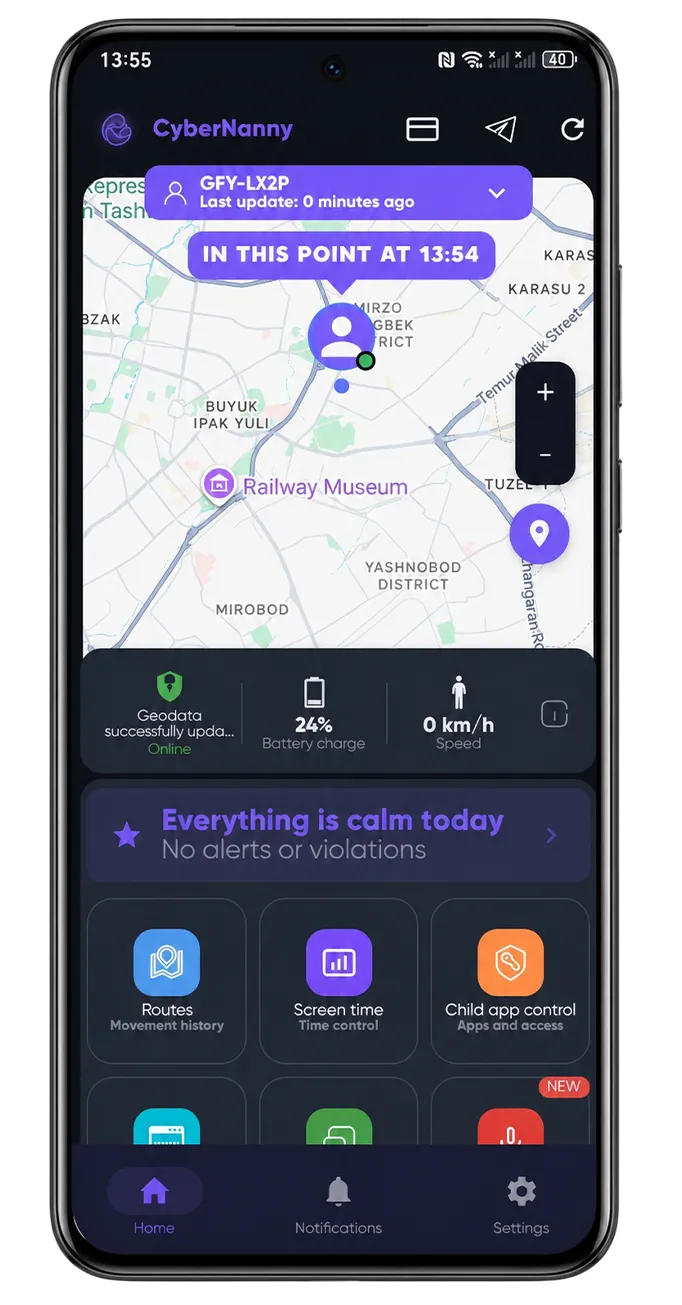
The CyberNanny — empowering parents in the digital realm. Modern parenting includes a new layer of responsibility: protecting children in a digital environment that didn’t exist a generation ago. Without proper tools, a parent is left helpless against threats they can’t even see — cyberbullying in school chats, predator contact through games, age-inappropriate content. CyberNanny is the tool that gives parents visibility, control, and timely intervention capability.
This article explains the philosophy behind CyberNanny, what makes it different from typical «spy apps», and how it actually empowers families rather than just surveilling children.
The problem CyberNanny solves
Every parent wants to know:
- Where is my child right now? Especially during transitions like school commute, after-school activities, going out with friends.
- Who is my child talking to? Especially online, where strangers can pretend to be peers.
- What content is my child consuming? Games, videos, social media — what’s actually being watched.
- Are there warning signs of trouble? Bullying, depression, predator contact, financial scams targeting children.
Without specialized tools, the answers are guesses. CyberNanny turns guesses into facts — while preserving the dignity of the relationship between parent and child.
Core capabilities
Location and movement
Real-time GPS tracking, daily route history, custom safety zones with arrival/departure alerts, speed monitoring. See where your child is and where they’ve been.
Communication monitoring
Calls, SMS, conversations in WhatsApp, Telegram, Viber, Instagram, and other major messengers. View by chat, by contact, by date.
App and content tracking
List of installed apps with usage time, browser history with timestamps, screen capture for visual context. Understand what your child does with the device.
AI Advisor — the unique feature
The artificial intelligence component analyzes communication patterns and content to detect:
- Cyberbullying signs (insults, threats, social isolation)
- Predator behavior (adults building inappropriate connections)
- Manipulation attempts (financial scams, fake friends)
- Mental health concerns (signs of depression, self-harm thoughts)
- Risky behavior interest (drugs, dangerous «challenges»)
The parent doesn’t need to read every message — the AI surfaces only what genuinely matters.
Telegram bot integration
Critical alerts come straight to your Telegram, no need to constantly check a separate dashboard. Get notified about important events as they happen.
What makes CyberNanny different from typical «spy apps»
Built for parents, not for surveillance
The product philosophy explicitly targets parental use cases. We don’t market for «spying on spouses» — that’s both illegal and counter-productive.
AI-filtered, not raw data
Many monitoring apps just dump everything in front of the parent — every message, every page visited. This makes parents into stalkers and breaks the relationship. CyberNanny’s AI surfaces only what matters.
Open mode for teenagers
We strongly encourage open mode for teens 12+: the child knows about the app, accepts the rules, takes ownership of their digital safety. This builds trust, not breaks it.
Privacy-first architecture
Data is encrypted in transit and at rest, accessible only to the parent who configured the device. We don’t share data with third parties, don’t use it for advertising, don’t sell to anyone.
Open mode vs hidden mode
CyberNanny supports both modes for different scenarios:
Open mode (recommended for teens 12+)
- App icon visible on home screen.
- Teen knows about monitoring.
- Family discusses the rules together.
- Teen takes responsibility for behavior.
- Trust preserved.
Hidden mode (for younger children)
- Suitable for ages 7-11 when the child can’t yet discuss complex digital safety topics.
- Used when monitoring needs to be unobtrusive.
- Should transition to open mode as the child grows.
Practical use cases
The new smartphone scenario
You give your 11-year-old their first smartphone. CyberNanny is installed at the same time, in open mode. The child accepts that «this is how phones work in our family» — like wearing a seatbelt in a car.
The teenage trouble scenario
Your 14-year-old has been increasingly withdrawn lately. CyberNanny’s AI Advisor flags a pattern of negative communications in school chats. You investigate — turns out classmates are bullying your child. You can act before depression sets in.
The teen romance scenario
Your 16-year-old is in a new relationship. You see general communication patterns are positive — that’s good. You don’t read specific messages — that’s their privacy. But if AI flagged manipulation patterns, you’d intervene.
The predator scenario
An adult contacts your 12-year-old through an online game, gradually building rapport, then asking for personal info or photos. AI Advisor flags this immediately — you can intervene long before the child is harmed.
Frequently asked questions
Is monitoring my own child legal? Yes, in all countries the parents of a minor have the right to oversee their child’s communications and online activity.
Will my child trust me less if I use CyberNanny? If you use it openly, with discussion, and respect privacy — no. If you secretly catch the child and use data for punishment — yes, trust will erode.
What about iPhone? The Android version is fully featured. iOS version is in development; due to Apple’s restrictions, it will have less functionality than Android.
How much does it cost? Free trial period for new users. Tariff plans for ongoing use are on the tariffs page.
Can I monitor multiple children with one account? Yes, family tariffs include up to 3 devices, corporate tariffs more.
Get started with CyberNanny
Sign up at thecybernanny.com and install the app. Within minutes, you’ll have visibility into your child’s digital life — empowering you to support, protect, and connect, not just observe.