
GPS Tracker for Kids: Live Map, Route History and Geofences
School finished forty minutes ago. The phone is online, but nobody picks up. Do you drive across town, call the school, or assume they simply stayed in the yard with friends and forgot to text?
A GPS tracker answers that question in five seconds. You open the map in your parent app and see a dot: school, playground, sports club, the road home. No phone calls, no panic — and, more importantly, no argument in the evening, because there is nothing to argue about.
- Tracking works through an app installed on your child's phone. Location "by phone number" does not exist — every site offering it is a scam.
- The live map shows the current position and when it was last updated.
- Route history shows where your child actually was during the day.
- Geofences for school, home and clubs send an alert on arrival and departure.
- Battery level of your child's phone is visible in the dashboard, so the tracker does not go dark unexpectedly.
Where your child is right now
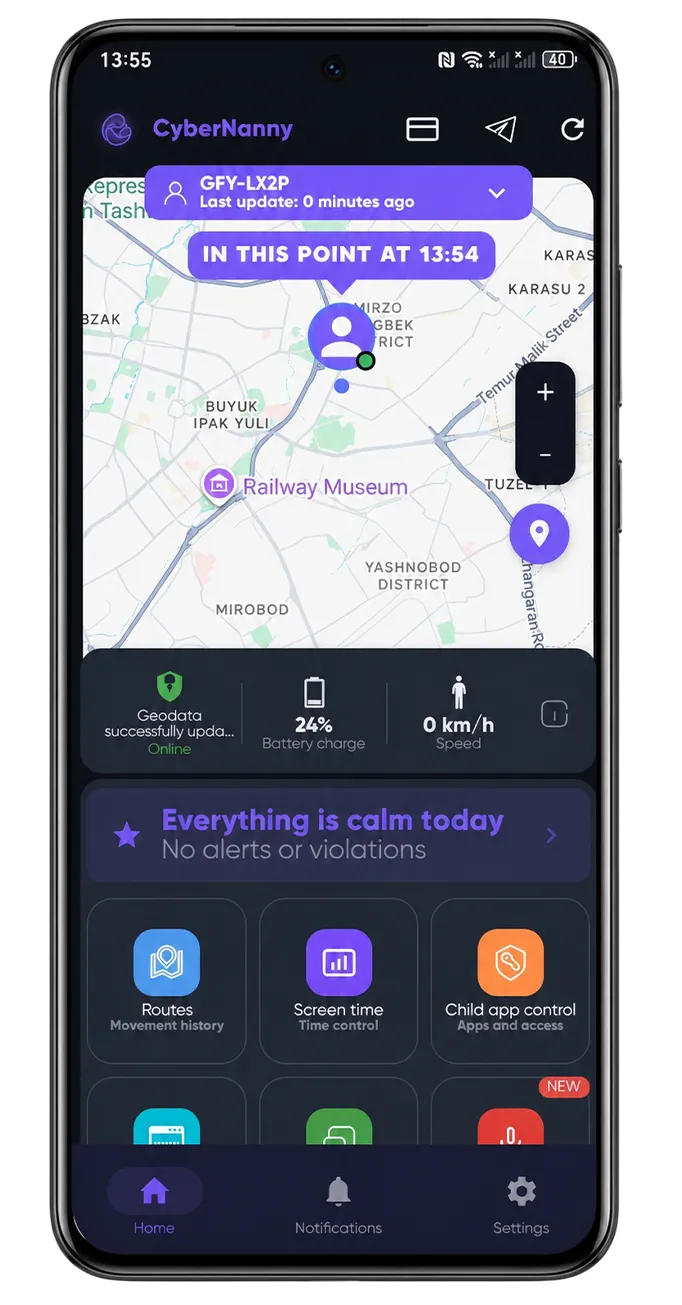
The main dashboard screen is a map with your child's position and a timestamp of the last update. If the phone is online, updates arrive continuously; if your child went into a basement or the metro, you see the last known point and its time — which is information too.
Next to the position you also see the battery level. It sounds minor, but it solves a real problem: seeing 7% at four in the afternoon tells you the phone may be dead by evening, so you can agree on a plan instead of guessing later.
If you have several children, they all appear on one map — no switching between profiles.
Route history: where they actually went
The live dot answers "where now". Route history answers the more awkward question — where they were when they said they were at school.
A day looks like a line with timestamps: left home at 7:40, at school from 8:10 to 13:30, forty minutes at a point next to the school (that is the shopping centre), home at 14:50. You read the whole picture in ten seconds.
One practical note on how to use it. Route history is not an interrogation tool — it is a way to notice patterns. If your child "stays late at school" every Tuesday exactly where the gaming club is, the conversation should start with curiosity, not accusation.
Geofences: alerts on arrival and departure
A geofence is a circle on the map around a place that matters. You mark the school, your home, grandparents, the sports club — and the app notifies you when your child enters or leaves.
In practice: 8:12 "Arrived at school", 13:35 "Left school", 14:50 "Home". Three notifications, and you spend the whole day calm without opening the map once. Parents who set up geofences call their kids "just to check" far less often — and those are exactly the calls teenagers resent most.
More on how location tracking works in practice: real-time location tracking explained and location control on Android.
When the location looks wrong
Honestly: GPS is sometimes off, and we would rather say so than promise centimetre accuracy. The reasons are almost always mundane.
- The phone is indoors. In a mall or basement satellite signal does not reach the device, so position is estimated from cell towers and Wi-Fi, with an error of hundreds of metres.
- Battery saver is on. The system itself reduces how often location updates.
- The app was put to sleep. Xiaomi, Honor, Huawei, Samsung and realme aggressively unload background apps. This is fixed once in the settings.
- Your child turned location off. You will see it: the dot freezes and the last-update time stops changing.
On iPhone there is an extra limitation — iOS controls background location access more strictly, so updates can arrive less often than on Android. That is a platform rule, not an app flaw.
A warning about "tracking by phone number"
Search results are full of services promising to locate any phone from its number alone. None of them work. Live location by number is held only by mobile carriers, who release it to emergency services and to account holders through official channels. Everything else is a subscription trap — we wrote about it in detail in phone tracking scams.
Try CyberNanny for free
Live map, geofence alerts, route history and battery monitoring are included in the free plan. Setup takes two minutes.
Get the appIs this spying?
We deliberately do not build a hidden mode. Your child knows the app is there, and that is a condition for it working long term — covert monitoring is discovered eventually, and what follows is not a conversation but resentment and a deleted app.
A workable framing sounds like this: "I am not going to read your chats with friends. I need to see that you got there. Then I will not call you every half hour." Most teenagers accept that trade readily — check-up calls annoy them far more than a dot on a map.
FAQ
Can I track my child's phone without installing an app?
No. Location data tied to a phone number sits with the mobile carrier, who releases it to emergency services and account holders through official channels. Any website promising to find a phone by number for a small fee is a scam.
Does GPS tracking drain the battery?
The app does not keep the GPS chip running constantly — it updates position at sensible intervals, so consumption is comparable to a messaging app. Your child's battery level is visible in the dashboard.
Does location work without internet?
Satellites provide the coordinates, but the phone needs a connection to send them to your dashboard. Without a network the app stores points and uploads them once connectivity returns.
What happens if my child turns location off?
Updates stop and you see it immediately — the last-update time freezes. That in itself is a reason for a calm conversation.
Does it work the same on iPhone?
Core features work on both platforms, but iOS restricts background activity more tightly, so updates on iPhone can be less frequent. Full functionality is available on Android.
How much does the GPS tracker cost?
The live map and geofences are part of the free plan, with no time limit. Extended route history is included in PRO.