
AI Parenting Advisor: Parental Control That Explains, Not Just Reports
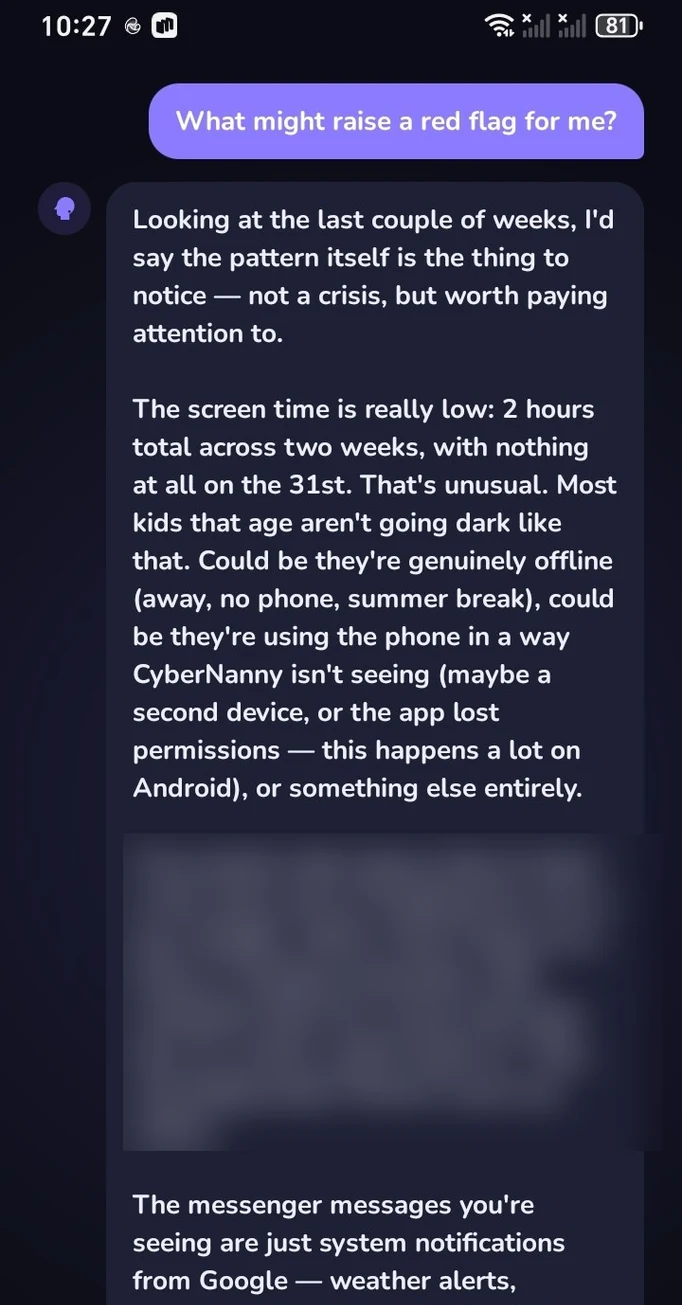
Every parental control app can show you a chart. Four hours and forty minutes of screen time, two of them in a game, seventeen new contacts this week. The question a chart never answers is this: is that normal, or is it time to do something?
And the next question is harder still. Suppose it is not normal — how do you bring it up without getting a slammed door?
The AI Advisor exists for those two questions. It is what Family Link, Kaspersky Safe Kids and Qustodio do not have: they hand you the data and leave you alone with the anxiety.
- The Advisor sees your child's actual data and answers for your situation, not in general.
- It handles two kinds of questions: is this normal for their age, and how do I talk about it.
- It gives you ready wording — usually the hardest part to invent yourself.
- Message content is not stored in models or used for training; analysis runs on aggregated metrics.
- One full answer per month is free. PRO removes the limit.
Numbers without interpretation only increase anxiety
A parent opens the report, sees "3 hours 40 minutes" and hits a wall. Is that a lot? The neighbour's child seems to be on the phone more. Online advice contradicts itself: some demand hard limits, others warn that restrictions destroy relationships.
Two things usually follow. Either the parent does nothing, because it is unclear what to do. Or they act abruptly — confiscate the phone for a week — and get a conflict after which the child simply hides better.
The Advisor closes that gap between data and action.
What you can ask
In plain language, the way you would ask a friend who happens to be a child psychologist:
- "My son is 12 and spends 3 hours a day on his phone. Is that normal?"
- "How do I tell my daughter the phone goes off at 22:00 without starting a fight?"
- "An adult in her chats is suggesting they meet. What do I do right now?"
- "My child started hiding the screen when I walk in. Should I be worried?"
- "How do I explain to a ten-year-old why parental control is on his phone?"
Answers arrive in 10–30 seconds, and they account for your child's age and what the data actually shows. You can ask follow-up questions — the Advisor keeps the context of the conversation.
Ready wording for the conversation
The most valuable part is not the diagnosis but the script. Most parents know something needs to be said; the difficulty is how to say it so it does not become a row.
The Advisor offers specific phrasing: how to open, what to avoid (for example, never start with "I saw everything"), how to leave your child a choice inside the boundary, and what to answer when they say "you don't trust me". You can use the wording verbatim — it is written so a teenager hears care rather than control.
How the AI assesses risk
Beyond answering questions, the Advisor works in the background, looking at combinations of signals rather than isolated numbers. A sharp rise in night-time activity, a new contact with more messages than the whole class combined, a change in tone — individually meaningless, together a picture.
When the picture looks concerning you get an alert explaining what triggered it. See messenger monitoring and AI alerts.
What about privacy
A fair question, answered directly. Your child's message content is not stored in models and is not used to train them. Analysis is built on aggregated metrics, and requests are transmitted encrypted.
The Advisor also does not reveal more than you already see in the dashboard — it explains existing data rather than exposing new data.
Try the AI Advisor for free
One full answer per month on the free plan — no card required. PRO removes the limit with 10+ requests a day.
Get the appFAQ
How is the AI Advisor different from a regular chatbot?
A general assistant needs the whole situation explained from scratch and answers in generalities. The Advisor already sees your child's data — age, screen time, activity, new contacts — so its answers apply to your family.
How many answers are free?
One full answer per month, with the counter resetting on the first. PRO removes the limit — 10 or more requests per day.
What data about my child goes into the analysis?
Aggregated metrics: screen time, app activity, appearance of new contacts, general characteristics of conversations. Message content is not stored in models and is not used for training.
Does the Advisor replace a child psychologist?
No, and we do not claim it does. It helps with everyday situations and with finding the right words. For serious problems — self-harm, depression, prolonged bullying — you need a professional.
Do other parental control apps have this?
At the time of writing, neither Family Link, Kaspersky Safe Kids, Qustodio nor Bark offers a full parenting advisor — they show reports without interpreting them.